|
| Žiga2218. 10. 2011 22:40:24 |
PZS released an app a few days ago that lets us see our mountains in 3D and plan hiking tours. The app has all huts, shelters, bivouacs and paths entered (even ranked by difficulty).
http://www.pzs.si/vsebina.php?pid=94
Well, that's all I know about it  . I have trouble installing it (doesn't create .exe file during installation), so can't give opinions or impressions - user experience. Of course I first emailed the address listed with the news on the link, but no reply yet. . I have trouble installing it (doesn't create .exe file during installation), so can't give opinions or impressions - user experience. Of course I first emailed the address listed with the news on the link, but no reply yet.
What I can say is it's a super move by PZS. Sure such apps need quite a few updates before they are 99.9% reliable, but that's inevitable for any software, especially in dev phase. Hope it's fixed before some guy crashes somewhere because of the app :P.
|
|
|
|
| lynx18. 10. 2011 23:37:03 |
it works for me, but I have penguins in my computer. You can really plan routes, even estimates time to the minute. It also suggests them based on desired time, and it's praiseworthy that it supports branches, side goals. Otherwise classic Gaea+. It also suggests them based on desired time, and it's praiseworthy that it supports branches, side goals. Otherwise classic Gaea+.
And through integration with Geopedia, it's also connected to hribi.net!
|
|
|
|
| grinhorn19. 10. 2011 11:20:17 |
Works for me too - on win7 32bit.
Otherwise I don't find all routes, but I just checked some in KSA... Probably there will be more in time... Nice
|
|
|
|
| Iksek19. 10. 2011 16:36:20 |
Works also on win 7 64 bit. First time I had issues too, because during installation it didn't "set up" exe files. I proceeded by simply reinstalling everything. And it worked. Colleague had same problem. He uninstalled and reinstalled GAEA+. And it works.
|
|
|
|
| gmajna19. 10. 2011 20:41:06 |
It works already, but kinda poorly. Loads bases slowly, probably overloaded server. 
Search is very poor, for start I chose Dovje (at Aljaž), target point to Kepa and this Gaea finds nothing. Not even marked paths. 
Ok, I typed Kepa in search, if it can find at least Kepa peak. That's funny, it finds 8 hits and you won't believe, only the eighth, last one, is actually Kepa peak. No location or height data next to hits, so user searching for a peak has to click through all?
I checked menus if I can add at least my GPS track to this base. Nothing.
True, Gaea+ has 3d view option, but that's all. Until they add all paths we find on maps, it's unusable.
|
|
|
|
| Pastirica19. 10. 2011 20:55:33 |
Really a bit strange. For me in normal version it loads tracks, in Gaea+PZS some yes, others no.
But need to first convert plt.,gdb.,... to KMZ. For now I do it with GoogleEarth.
 1 1
|
|
|
|
| gmajna19. 10. 2011 21:33:44 |
Later I even managed to load a .gpx file; first the base just disappeared, white screen instead of image. When I clicked a bit and re-enabled the base, the track appeared too. It seems a bit buggy to me, early alpha development phase.
And anyway, a 3D image with mountain icons doesn't seem like a good idea to me; at least they could display mountain names, like if on Geopedia you put a name layer over the orthophoto. 
I'll continue using Geopedia; it works decently and the maps are much better.
(I do conversions between formats with GpsBabel)
|
|
|
|
| lynx19. 10. 2011 22:09:24 |
By the way, it estimates times based on elevation difference and length, like the couple of graphs on some maps serve as an aid.
|
|
|
|
| KristinaG20. 10. 2011 14:09:31 |
For me it doesn't work at all. It starts normally, shows the map etc. Then, when I want to zoom in on something, "crash" and it closes itself. 
|
|
|
|
| Pastirica20. 10. 2011 16:34:18 |
I agree, they will have to improve things quite a bit more. Sometimes it helps if you reload it. Apparently the graphics card (type) and updated drivers for that card, as well as the latest Java, are important. Those are their tips if you ask for help. I myself had problems with drawing the planned route. Somehow (although not entirely satisfactorily) we solved it then. But I like exactly that option (drawing the route on orthophoto). Otherwise, the people at GAEA+ are really friendly; they can even connect to your computer and try to find the error.
Gmajna, does it also load .gpx? I haven't tried yet. I have GpsBabel, but it went with OziExp - look in Google Earth - save place as.
|
|
|
|
| Pastirica20. 10. 2011 17:40:46 |
No, this is for more advanced experts than me. The .gpx loaded into "my contents"; after clicking the file it even zoomed the terrain, but there was no track at all. Then I removed Google Earth from the computer; now it loads and displays both KMZ and .gpx.
|
|
|
|
| ladko23. 10. 2011 17:23:59 |
I have the same problem as KristinaG, has anyone found a solution?
|
|
|
|
| bostjanp24. 10. 2011 09:22:07 |
@ladko and kristina
Example: at work on laptop the app works but no paths marked and very "jerky". At home on regular PC it works fine. In tools/settings/display play a bit with quality; kak.viš.mod I have on high, bottom slider same position and vert stretch on 2. Maybe normal operation depends on graphics card capability, processor and RAM. Have you tried this link too and does it work ok? http://www.geopedia.si/#T184_x470052_y133704_s13_b2
|
|
|
|
| ladko24. 10. 2011 17:07:44 |
My PC is ok, connection 10M, program loads-starts then closes (attaching screen where it closes).
Geopedia works fine for me.
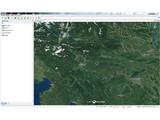 1 1
|
|
|
|
| bostjanp24. 10. 2011 19:04:11 |
From there it should start loading paths, hut markers etc... In bottom right corner there's a blue thing for offline mode. Try turning that off as it zooms the map. Check firewall settings too, no accidental block for the program; Windows firewall, advanced settings, find Gaeaplus there and it should have green check. Or another solution. Uninstall program and reinstall into folder with different name. Maybe something broke during install. Did you update Java before install?
|
|
|
|
| wolphgang24. 10. 2011 22:19:46 |
excellent PZS, keep it up
|
|
|
You must log in to post a comment:
If you do not yet have a username, you must first
register.